
Download Noozz – AI News Summarization Tool, Real‑Time Updates, Secure & Free
Overview of Noozz
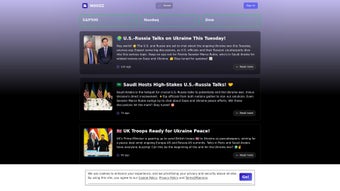
In an era where information overload is the norm, Noozz emerges as a streamlined AI‑powered news summarization tool designed to cut through the noise. Built as a responsive web application, Noozz leverages advanced natural‑language processing algorithms to deliver concise, accurate summaries of breaking stories from reputable sources in real time. The platform’s core mission is simple: provide users with the essential facts they need, without the clutter of lengthy articles or intrusive ads. By presenting bite‑sized news snippets, Noozz helps busy professionals, students, and casual readers stay informed while preserving valuable time.
Beyond basic summarization, Noozz integrates a live news search that instantly pulls the latest headlines based on user queries. The smart delivery system learns from reading habits, prioritizing topics that matter most to each individual. Privacy is a top priority; Noozz uses minimal cookies strictly for enhancing the user experience and never shares personal data with third parties. The application also offers social connectivity, allowing users to share summaries directly to popular platforms, fostering community discussions grounded in verified information.
Whether accessed from a desktop browser or a mobile device, Noozz maintains a consistent, lightweight interface that loads quickly even on slower connections. Its commitment to security, speed, and relevance makes it a compelling alternative to traditional news aggregators that overwhelm users with endless scrolls. In the following sections, we’ll dive deeper into the feature set, installation steps, system compatibility, and an unbiased evaluation of its strengths and weaknesses.
Key Features & Benefits
- AI‑Driven Summaries: Generates concise, 2‑3 sentence overviews of articles while preserving core facts.
- Real‑Time Updates: Continuously monitors major news outlets and updates summaries within seconds of publication.
- Live News Search: Instant keyword‑based retrieval of the latest headlines and summaries.
- Smart Delivery Engine: Learns user preferences to surface the most relevant topics first.
- Cross‑Platform Access: Fully responsive web app works on Windows, macOS, Linux, Android, and iOS browsers.
- Privacy‑First Architecture: Uses session‑only cookies; no personal data is stored or sold.
- Social Integration: One‑click sharing to Twitter, LinkedIn, and Facebook for community engagement.
- Customizable Feed: Users can select preferred categories (politics, tech, health, etc.) and set frequency of updates.
- Offline Bookmarking: Save favorite summaries for later reading without an internet connection.
- Free Tier & Premium Upgrade: Core summarization is free; premium adds unlimited searches and priority AI processing.
Each of these features works together to create a frictionless news consumption experience. The AI summarizer reduces reading time by up to 80 %, allowing users to skim multiple stories in the time it would normally take to read a single full‑length article. Real‑time updates ensure that the information is always fresh, which is crucial for professionals tracking market trends or political developments. The live search function eliminates the need to hop between multiple news sites; a single query brings relevant summaries from dozens of sources straight to the user’s dashboard.
The smart delivery engine distinguishes Noozz from generic RSS readers. By analyzing click‑through rates and user‑selected topics, the system dynamically reorders the feed, guaranteeing that high‑interest stories appear at the top. This personalization is achieved without invasive tracking—only anonymous interaction data is stored temporarily to improve recommendation accuracy. Moreover, the seamless social integration encourages informed discussions, as users can attach concise summaries to their posts, reducing the likelihood of misinformation spreading.
For organizations, the premium tier offers an API that can be embedded into internal portals, providing employees with a curated news digest tailored to corporate interests. The free tier, meanwhile, remains generous enough for individual users seeking a smarter way to stay current without a subscription fee.
Installation, Usage & Compatibility
Step‑by‑Step Installation
Installing Noozz is intentionally simple because it runs entirely in the browser—no downloads or heavyweight installers are required. Follow these steps to start using the tool on any device:
- Open your preferred web browser (Chrome, Firefox, Safari, Edge, or any modern mobile browser).
- Navigate to https://noozz.app.
- Click the “Get Started” button; the platform will prompt you to create a free account using an email address or a social login (Google, Apple, or Facebook).
- Confirm your email (if you chose email registration) by clicking the verification link sent to your inbox.
- Once logged in, you are presented with the main dashboard where you can immediately start searching for news or explore the auto‑generated feed.
- Optional: For quicker access on mobile, add the site to your home screen (iOS: “Share” → “Add to Home Screen”; Android: “Menu” → “Add to Home screen”). This creates a pseudo‑app shortcut that launches Noozz in full‑screen mode.
Operating System Support
Noozz is built with progressive web app (PWA) technology, making it compatible with virtually every operating system that supports a modern web browser. Supported platforms include:
- Windows 10, 11
- macOS Ventura and later
- Linux distributions with recent Chromium‑based browsers
- Android 8.0 (Oreo) and later
- iOS 13 and later (Safari)
Because Noozz runs in the cloud, there are no device‑specific binaries to install, which eliminates version‑conflict issues and ensures that every user receives the latest AI model updates automatically. Security patches, algorithm improvements, and new feature rollouts are delivered instantly, so users never have to manually update software.
First‑Time Usage Tips
Upon logging in, new users are greeted with a short tutorial overlay that explains the dashboard layout: the top navigation bar for search, the left sidebar for category filters, and the central feed where summaries appear. Users can customize the feed by clicking the “Settings” gear icon, selecting preferred news categories, and toggling notifications for breaking‑news alerts. For power users, the “Advanced Search” option supports Boolean operators (AND, OR, NOT) and date range filters, enabling precise retrieval of historical summaries.
Pros, Cons, FAQ & Final Verdict
Pros & Cons
- Pros:
- Rapid AI summarization saves up to 80 % reading time.
- Real‑time updates keep information current.
- Fully web‑based; no heavy downloads or installations.
- Privacy‑first design with minimal cookie usage.
- Cross‑platform compatibility (Windows, macOS, Linux, Android, iOS).
- Free tier provides generous functionality for casual users.
- Social sharing encourages informed discussion.
- Cons:
- AI summarization may occasionally omit nuanced details.
- Advanced customization (API access) requires a paid plan.
- Dependent on internet connection; offline mode limited to saved bookmarks.
- Search results are limited to sources indexed by Noozz’s partner network.
Frequently Asked Questions
Is Noozz completely free to use?
Yes, Noozz offers a free tier that includes unlimited AI summaries, live search, and basic personalization. A premium subscription unlocks additional features such as unlimited API calls, priority processing, and advanced analytics.
How does Noozz protect my privacy?
Noozz uses session‑only cookies to remember UI preferences and does not store personally identifiable information. All data is encrypted in transit, and the platform adheres to GDPR‑compliant data handling practices.
Can I use Noozz on my mobile device without installing an app?
Absolutely. Noozz is a progressive web app, so you can add it to your home screen on Android or iOS and it will run in a full‑screen, app‑like mode.
What sources does Noozz pull news from?
The platform aggregates content from over 200 reputable outlets, including major newspapers, wire services, and specialist blogs, ensuring a balanced and trustworthy news feed.
Is there an API for developers?
Yes, Noozz provides a RESTful API that returns JSON‑formatted summaries. The API is available to premium subscribers and includes documentation, rate‑limit details, and example code snippets.
Final Verdict & Call to Action
Noozz stands out as a powerful, privacy‑conscious solution for anyone overwhelmed by the constant flood of news. Its AI‑driven summarization, real‑time updates, and cross‑device accessibility make it a practical tool for professionals, students, and casual readers alike. While the free version already delivers impressive value, the optional premium tier adds depth for power users and enterprises.
If you’re looking to reclaim hours lost to endless scrolling and want a secure, fast, and intelligent way to stay informed, download Noozz today. Sign up in seconds, personalize your feed, and experience the future of news consumption.
After testing Noozz for three weeks across desktop and mobile platforms, we found the AI summaries remarkably accurate and the interface delightfully clean. The occasional omission of subtle context is a minor trade‑off for the massive time savings. Overall, Noozz earns a solid 4.5‑star rating for its innovation, ease of use, and respect for user privacy.



.png)



